

PROTEL Autotrax VESA video drivers
| Version | 1.14 |
| Date | 18 March 2013 |
| Features |
|
| Download | easyvido.zip 68,463 bytes (complete package) |

Installing Autotrax VESA Drivers
Autotrax will be installed in a directory on your hard drive, normally C:\AUTOTRAX. It is convention that you place all the VESAnnnn.DRV files in that directory also. You will see other video driver files, such as VGA640.DRV in that directory already. To install a video driver, for instance the most useful VESA1280.DRV, you need to copy VESA1280.DRV over GRAPH.DRV, replacing the original. When Autotrax starts it incorporates whatever is named GRAPH.DRV as its video driver. If you happen to have Protel Schematic V3.31, the same graphics driver will also work for that package.
To run Autotrax under DOSBox 0.74 it is best to
use vesa1280.drv. If a lower resolution fits
the screen/laptop better, then choose one of these from the
supported resolution list
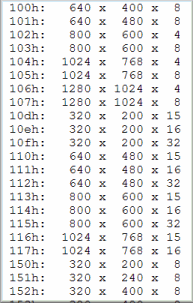 on the Autotrax under DOSBox page. DOSBox may be updated in future releases to support
higher resolutions, either search to check for this, or run the lfb
tool inside DOSBox to get a report of what resolutions (and mode numbers) your current
version of DOSBox supports. Other than that, installation under DOSBox is a cinch, and
none of the trouble shooting info below should concern you - to complete a
DOSBox Autotrax install, click here.
on the Autotrax under DOSBox page. DOSBox may be updated in future releases to support
higher resolutions, either search to check for this, or run the lfb
tool inside DOSBox to get a report of what resolutions (and mode numbers) your current
version of DOSBox supports. Other than that, installation under DOSBox is a cinch, and
none of the trouble shooting info below should concern you - to complete a
DOSBox Autotrax install, click here.
For an installation under XP, please consider trialing the Autotrax XP video driver.
To run autotrax directly (natively) on a system (eg DOS, NT, WIN XP, WIN98) first check that the video card runs VESA BIOS - most name brand video cards do this - although it may be necessary to get updated VESA DRIVERS from the video card manufacturers website.
A quick check using the LFB test tool (see image, right) will yield a list of resolutions and VESA modes available on the system. Select a setting from the list generated on the system, and match it up against a driver available from AirBorn Electronivs. There are about 20 different drivers in the download package. If the driver resolution required is NOT in the zip file the VESA graphic driver source is available - it is quite possible to download this and make a new driver to suit. (or ask nicely, and when we have the time here at AirBorn, we can do it for you)
The real issue comes with the higher resolutions that we all want to use to get the most out of the software... the mode numbers are not standardised, which is why using this diagnostic tool is quite important.
The only original protel video driver that works reliably on modern hardware is VGA640.DRV
- Basic Install for Autotrax and these drivers, natively under an OS:
- Copy file and rename as GRAPH.DRV in autotrax directory
- Make a .PIF shortcut (or other as appropriate) to autotrax
- Edit the Cmd line and working directory to match autotrax
- Select "Screen: Usage: Full-screen"
- Optionally: It may help to have mouse set to "exclusive"
- Optionally: Select "Run program minimized"
- Try the install with the standard VGA640 driver first
- Problems? Use path test tool, then try shortening PATH
- Download and install your video cards up-to-date VESA driver
- Problems? Use vesa test tool, then try downloading drivers
- After installing your new GRAPH.DRV, try alt-tabbing
- Problems? or works OK? Either way, email
 and tell us.
For a nice PCB desktop icon, click here.
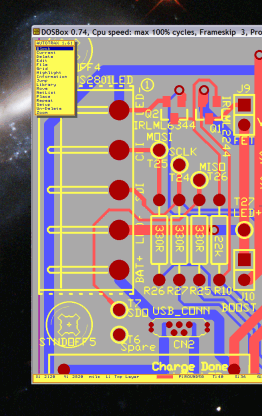
These drivers, to atleast 1024x768, have also been run under XP, win2k, OS2 and dosemu 1.02.0 on suse8.1 kernel 2.4.19 and debian. The 640x480 standard driver supplied with autotrax (vga640) seems to work with just about any system that can run Autotrax natively.
Anyway, our recommendation is to run Autotrax inside DOSBox 0.74, there are DOSBox ports to many, many operating systems, and it just works, saving your time. Also, when the next version of windows breaks something else in your setup, someone is likely to rework DOSBox (it is open source) and so release a fix soon after. After all, None of us really want to spend our day fixing IT issues!
This driver is hereby released into the public domain, and you can do what you like with it with no obligation. It was written by AirBorn, and is open source. These drivers may well be updated, check back on this webpage, periodically, for new versions: www.airborn.com.au/layout/easytrax.html
If when first trying this driver you get no picture at all, or a picture that is badly distorted EXIT THE PROTEL PROGRAM. The key sequence for exiting Dos Protel is [Esc] [Esc] [F] [Q] [Y] - write this down, you may not be able to read this when your screen is completely black!
Some of the strangest problems have been fixed by updating
the video card driver - for instance garbage left after screen redraw
would seem very much like a hardware problem, yet two users
have had this fixed by downloading a new manufacturers vesa
video driver. Sometimes problems are fixed by changing system
 settings - but its pretty rare, only "run full screen" seems to really matter.
The author has found (on some systems) that the screen refresh rate is much faster
(less flicker) when using a driver with the same resolution as the
windows screen settings.
settings - but its pretty rare, only "run full screen" seems to really matter.
The author has found (on some systems) that the screen refresh rate is much faster
(less flicker) when using a driver with the same resolution as the
windows screen settings.
A proportion of users seem to have significant problems running under XP because the path environment variable is longer than about 56/66 characters. Detail here for info on this problem.
Getting the VESA drivers working on XP laptops can also be problematic, even when they do claim to have VESA support. On one laptop, we found that the driver would come alive by: Run autotrax (but see just black), alt-tab back to windows, click twice on the Autotrax tab in the start bar, then press Function-F2. Research has not revealed why this particular key-hopscotch should work - Function-F2 was normally used to swop to external video.
There have been a few installs where the screen is not correctly redrawn after Alt-Tab switching. If the suggestions above don't sort out the problems, it is worth trying the modeforce drivers VnnnnMDF.DRV - but after other avenues have been exhausted, as the modeforce drivers have a distinct performance penalty. Apologies for listing all of the problems first, but with this advice, 95% of installs should work first time, - either that or the reader will be rightly scared into using DOSbox rather than attempting a native install.
Links to other Autotrax material
- Our Autotrax Resources list
History: Autotrax under Windows
Successive versions of Windows have broken Autotrax and required workarounds. Windows 98 ran Autotrax quite well, although most video hardware would only support 640 x 480 resolution, and required our VESA drivers. Later, XP also ran Autotrax, but only using either the VESA drivers or our XP Driver. With later versions of windows there is no native support at all. Autotrax runs well under DOSBox, (using our VESA driver inside DOSBox), and will now run on just about any Platform. It is very likely that DOSBox will be ported to run on all future versions of windows. Even on a system still running XP, I still prefer the DOSBox solution to the XP Driver, but ofcourse people can take their pick.
Source code for these vesa drivers (X86 assembler)
GRDRVSRC.ZIP
- Contact Us
- Enquiry Form
- Sitemap
- The PCB design method
- About Circuit diagrams
- About PCB layout
- About Firmware design
- Spec'ing your job
- Our design service
- Autotrax PCB on Win8
- Autotrax VESA Drv
- Autotrax Resources
- Autotrax Library
- Autotrax Useage
- Autotrax Printer Drv
- Autotrax XP Driver
- 6 layer Autotrax PCB
- Autotrax Utilities
- Autotrax File format
- Autotrax Manual
- Autotrax Tutorial
- Example Projects Library
- Mechatronic control unit
- Garbage truck compactor
- RS232-RS485 convert (2006)
- Tone generator test project
- RS485 fire panel int.
- Front panel switches( A/D)
- Serial to IRDA
- Danfoss loop tester
- RAN Multilayer trainer
- Programmable Oscillator
- Pressure sense PCB
- Nursecall overdoor light V2
- Design step-by-step
- Circuit diagrams
- PCB Layout
- PCB Etching
- Prototyping
- Firmware design
- Documentation
- Manufacturing
- Economies of scale
- Test Procedures
- ECOs - changes
- EMI & ESD in design
- FR4 and fire resistance
- Project Specifications
- Specification Intro.
- Writing a Spec
- Tech Ingredients
- Example Specs (older)
- Selecting a designer
- R&D Economics
- Design Inspiration
- Autotrax Utitilities
- Autotrax links
- Our PicoBus IO Std
- RS232 connectors
- Our RS485 converter
- P89LPC932
- Our Program header
- How to use a Multimeter
- Our Site index
- Offsite Links (15000+)
- Google search
- Contact
©2013 AirBorn - Last updated 01 May 2013